Management
The Management tab is exclusive to Appointment Users with Manager permission. Managers perform tasks such as setting office schedules, transferring appointments, updating access lists, and viewing reports. Sub-tabs available under the Management tab include Master Schedules, User Schedules, Transfer Appointments, Access List Members, and Reports.
Master Schedules
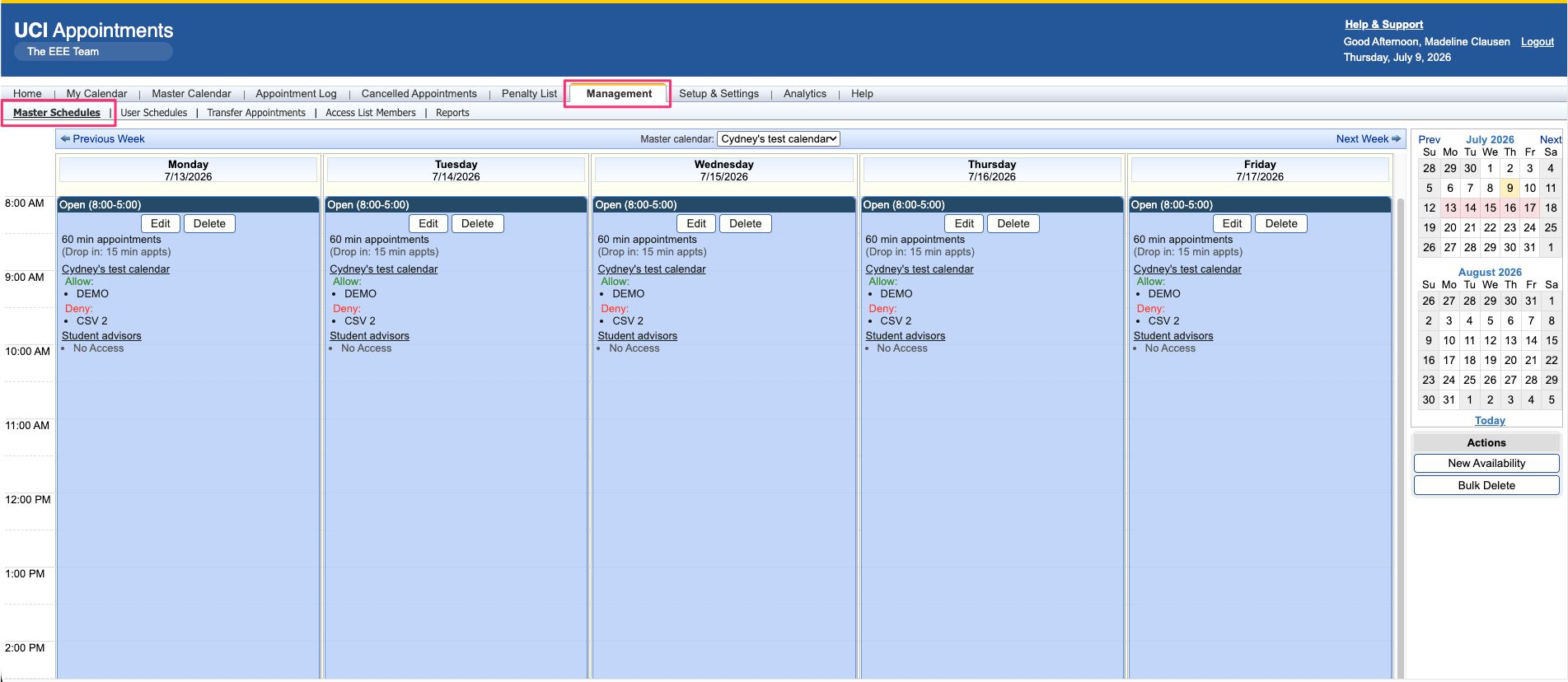
On this sub-tab, Office Managers control the office schedule, which combines with user availability to create appointment slots. The Master Schedule features a calendar screen displaying office availability by week and provides options to control the date range, navigate weeks, and return to today’s date. It also allows the creation/deletion of items on the master schedule, editing existing items, and defining access lists.
User Schedules
The User Schedules sub-tab allows managers to enter schedules for specific users and enables managers to update user availability when necessary.
Transfer Appointments
The Transfer Appointments sub-tab is used when an advisor is absent to redistribute appointments to other advisors. It allows the removal of open slots, moving appointments to other calendars, and forcing appointments if necessary.
To transfer appointments to another advisor:
- Remove any availability blocks for the advisor by clicking the ‘x’ icon. This will cause the system to remove any remaining open appointment slots from the absent advisor’s calendar.
- Move any appointments to other advisors where possible. You can either drag the appointment from the left panel over to the open slot on the right panel or click the ‘move’ icon.
- After transferring the appointment, confirm the new details and click the Ok button.
The following video walks through the steps mentioned above.
Access list Members
The access list sub-tab allows managers to view and manipulate members belonging to specific access lists. It provides options for adding, editing, and deleting members individually or in bulk.
